
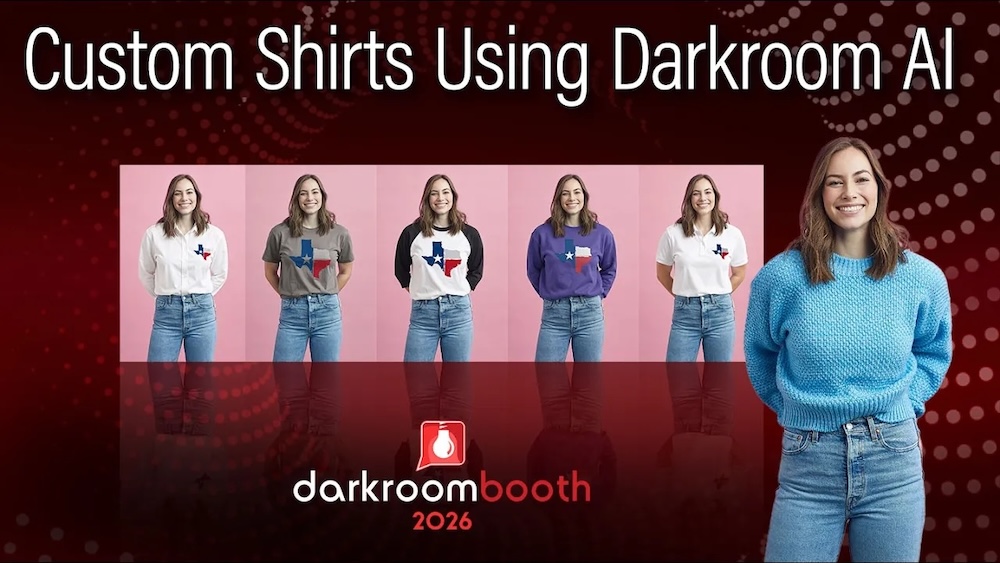
Learn how to create custom AI shirts with logos, colors, and styles for branded photo booth experiences your clients will love!
What if every guest at your event could instantly become part of your brand?
With the new AI Custom Shirt feature in Darkroom Booth 2026, that’s exactly what you can do.
In this latest tutorial, Eugene shows how easy it is to transform a guest’s outfit into a fully branded shirt—whether it’s a t-shirt, polo, hoodie, or something completely custom. The result? A powerful, shareable experience that boosts brand visibility and creates memorable, personalized images.
Why AI Custom Shirts Are a Game-Changer
This feature isn’t just fun—it’s incredibly practical for branded events and corporate activations.
Imagine:
- A corporate event where every guest leaves wearing your company logo
- A charity fundraiser where attendees “wear” the cause
- A brand activation where every photo becomes a marketing asset
Guests arrive in their normal clothes… and leave with a photo that looks like they were part of your brand all along.
That’s next-level engagement.
How It Works
Like other AI features in Darkroom Booth, everything is controlled through your output template.
Here’s the basic workflow:
- Open your output template
- Select your image node
- Choose a shirt style (t-shirt, polo, etc.)
- Set your color
- Add your logo or graphic
- Run a test image or session
Within seconds, Darkroom AI processes the image and replaces the subject’s clothing with your selected design.
It’s fast, flexible, and surprisingly realistic.
Customize Every Detail
One of the biggest strengths of this feature is how much control you have.
👕 Shirt Styles
Choose from built-in options like:
- T-shirts
- Polo shirts
- Baseball tees
🎨 Custom Colors
Need exact brand colors? No problem.
You can:
- Use RGB values for precise matching
- Adjust colors with sliders
- Dial in your exact brand look
🖼 Logos & Graphics
Upload and apply your own:
- Company logos
- Event branding
- Sponsor graphics
This makes it perfect for corporate clients and sponsored events.
Go Even Further with Custom Shirts
Want something beyond the built-in styles?
Switch to Custom Shirt Mode.
This allows you to:
- Use a reference image (like a hoodie or specialty apparel)
- Apply unique designs not included in default options
- Create completely custom looks
For example, Eugene demonstrates swapping in a branded hoodie—instantly transforming the subject into a fully styled, on-brand look.
Real-Time Performance That Works at Events
Speed matters at events—and this feature delivers, images are processed quickly enough to keep lines moving and guests engaged. That means you can confidently use AI Custom Shirts in:
- High-volume photo booth setups
- Corporate activations
- Experiential marketing events
Make It Fun (and Shareable)
Beyond branding, this feature opens the door to creative experiences.
You can:
- Offer multiple shirt styles for guests to choose from
- Create themed designs (sports teams, holidays, inside jokes)
- Add unexpected or playful elements
This is a great feature to share using Darkroom’s built-in sharing features, whether that is text, email, print, or all three.
Why This Matters for Your Business
AI Custom Shirts aren’t just a feature—they’re a revenue and differentiation opportunity.
They help you:
- Stand out from competitors
- Offer premium, high-value experiences
- Increase brand exposure through social sharing
- Create upsell opportunities for clients
In short: more value for your clients, more revenue for you.
Try It Yourself
This is one of those features that really clicks once you see it in action.
Set up a template, run a few test sessions, and experiment with different styles, colors, and logos. You’ll quickly discover just how powerful—and fun—this can be. Eugene created some sample files you can experiment with, located here in the Darkroom help center.
Watch the Full Tutorial
Want to see exactly how it’s done?
👉 Watch Eugene’s full walkthrough on YouTube and follow along step-by-step.
Final Thoughts
With AI continuing to evolve, features like Custom Shirts are pushing photo booth experiences into entirely new territory.
You’re no longer just capturing moments—you’re creating branded, personalized experiences in real time.
And that’s exactly what today’s clients are looking for.